Basic Disassembly with Radare2
- Sarang Joshi
- Jan 20, 2021
- 2 min read

Radare2 is a popular open source reverse engineering tool that can be used to disassemble a binary and analyze it. It provides an excellent starting point for starting static analysis at the binary level. For example, if we want to know how many functions are in a compiled binary, or if we want to analyze the call flow graphs in a function, it is possible with this utility. R2's readme talks about its origins as a forensics tool and scriptable editor that could open disk files. If that wasn't exciting enough, it's modern form lets you analyze binaries, disassembles code, helps with debugging and attaches to remote gdb servers. It is indeed a powerful tool in any system engineer's toolbox. In this post, I'll help you setup radare2, rather the modern rewritten radare2 called r2, on your system and test it out with a basic binary. Excited? Let's go!
Setup
We start with downloading it from Github. There are options to download from the apt, tarball or wget as well but the most up-to-date version is found on Github.
git clone https://github.com/radare/radare2
cd radare2
sys/install.sh
The last step updates the repo with the latest changes from Github and installs it. You can also use the following command to install without root.
sys/user.shThese scripts puts the symlinks for the relevant binaries into your /bin/ directory. After installing, you can search /bin for r2 and other relevant binaries. For now, we will use r2. Let's start ripping apart a few binaries to see whether r2 has been installed correctly.

We start by analyzing /bin/ls, our standard ls command that shows us directory contents. The second command aa analyzes all symbols that start with sym which indicates a function or symbol name and entry0 which indicates the program's entry point. To display all these values, we use the next command, afl, as shown below.

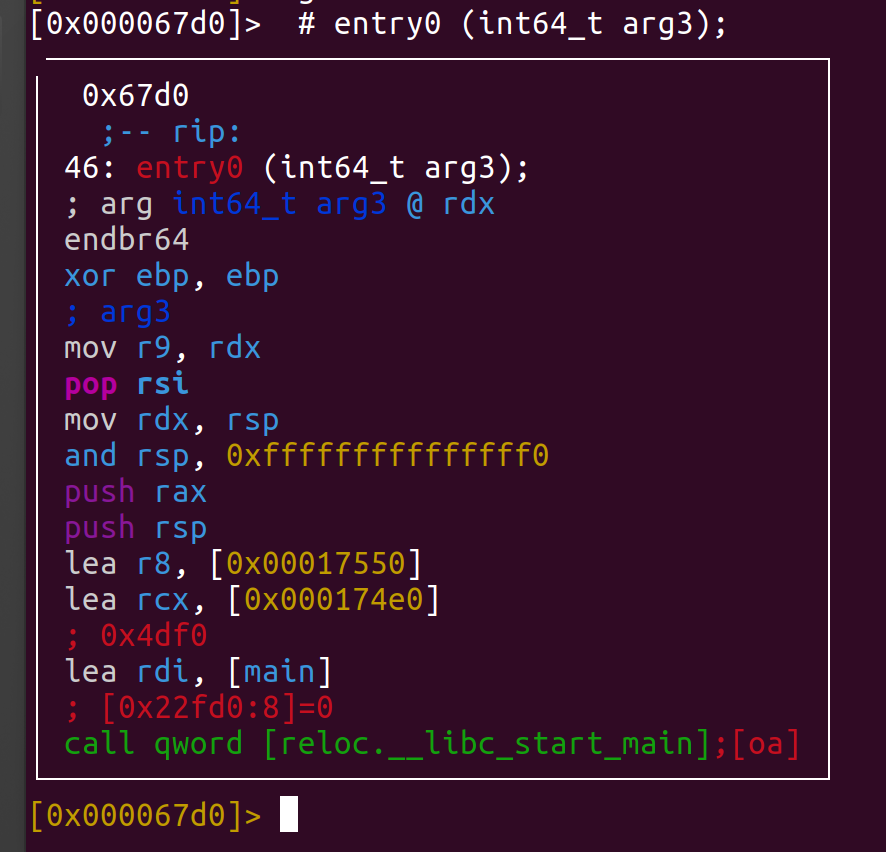
Radare 2 provides a set of primitives or commands that can be used to analyze the disassembled binary. For example, if a user wants to analyze the basic blocks in a function, it can be done using the 'agc' command. The syntax is as follows.
agc <function_name>The following output is generated. As we notice below it uses the the mov, xor, pop instructions on the CPU registers. In addition, it also calls a function qword on the last line.


Comments